
Render Hooks
Inject custom HTML, Livewire components, or Blade views into specific positions across the admin panel without modifying Shopper's core views.
Render hooks give you named injection points inside Shopper's admin views. Instead of overriding templates, you register a callback on a hook name and Shopper renders your content in the right place at the right time.
This is the recommended way to add content to an admin page: a banner in the sidebar of the order page, a widget above the product list, or a tracking script in the page head.
Registering a Hook
Your application registers hooks on the admin panel through the Shopper facade, in the boot() method of a service provider:
use Shopper\Facades\Shopper;
use Shopper\View\OrderRenderHook;

public function boot(): void
{
    Shopper::renderHook(
        OrderRenderHook::DETAIL_SIDEBAR_AFTER,
        fn (): string => '<p class="text-sh-fg-muted text-sm">Ships from the Lyon warehouse.</p>',
    );
}
The text shows at the end of the sidebar of the order page, below the billing address:
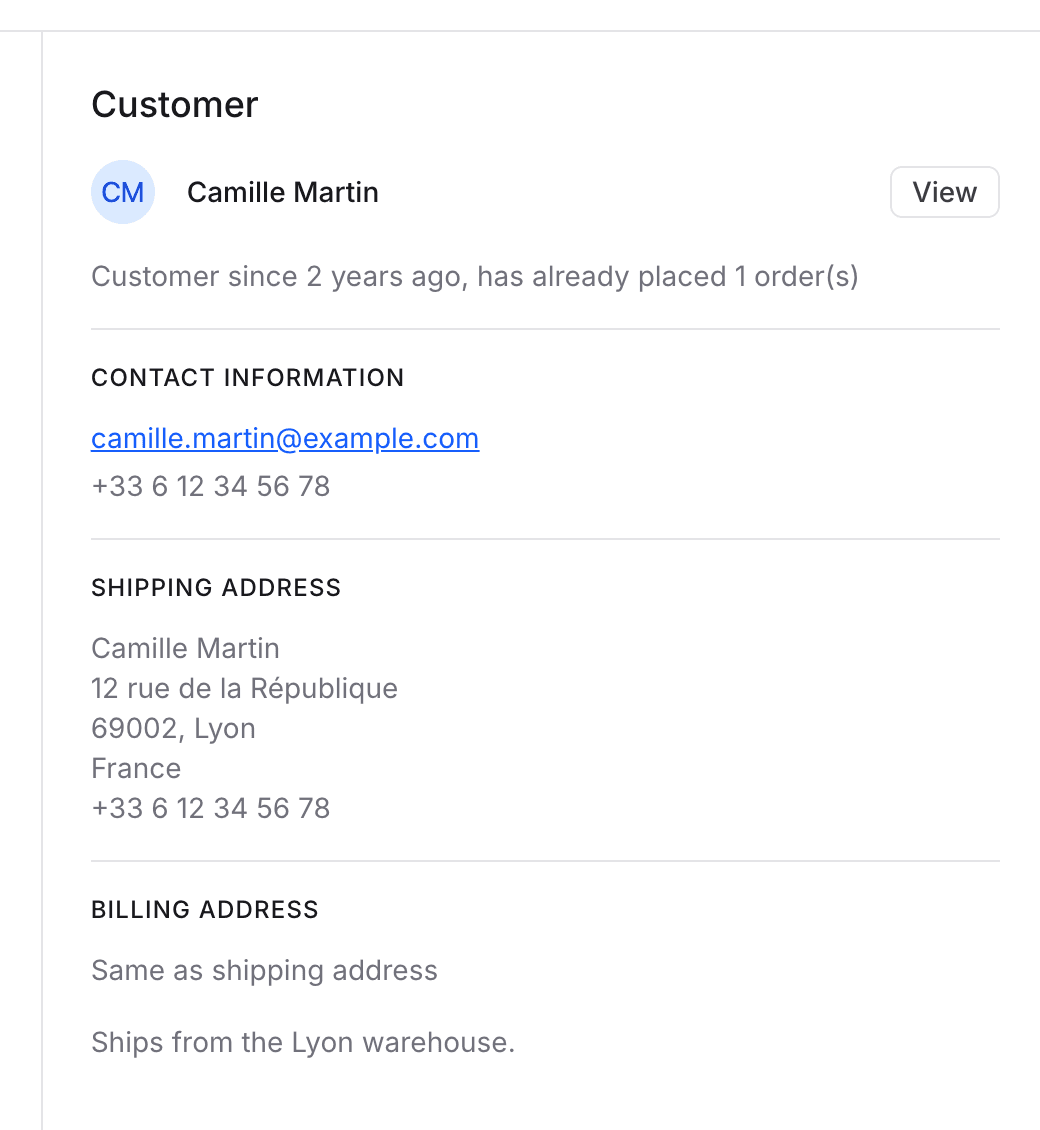
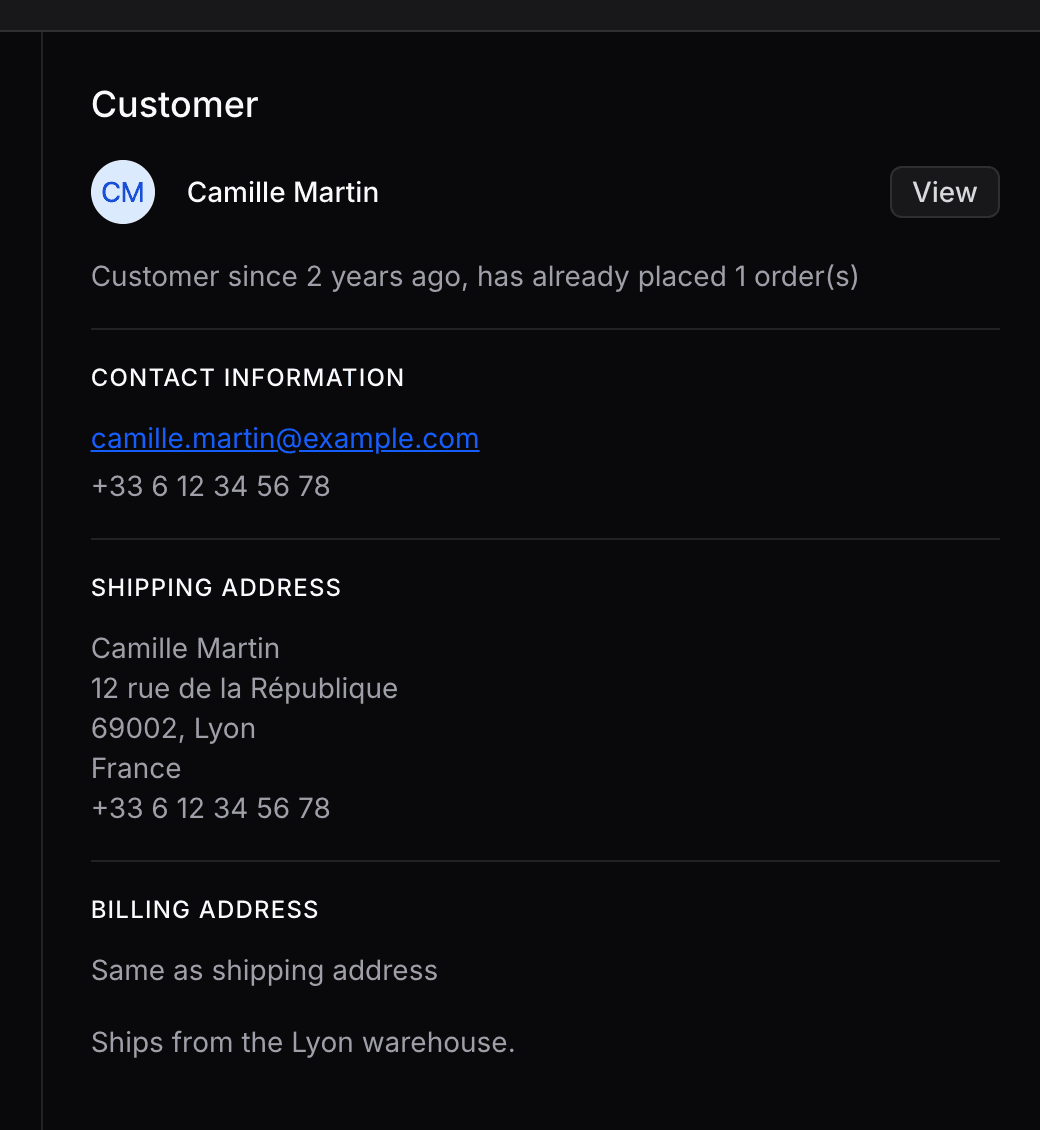
The callback receives no arguments. Shopper casts what it returns to a string and outputs it as HTML without compiling it with Blade, so return plain HTML, a view, or a Livewire component rendered with Blade::render(). The HTML is not escaped: pass any value that comes from a record or a request through e(), or render it in a view with {{ }}.
An add-on registers its hooks with $panel->renderHook() in the register() method of its add-on class, as described in Render Hooks of the add-on guide.
Returning a Blade View
A view is rendered when Shopper casts it to a string, so the callback can return it as is:
use Illuminate\Contracts\View\View;
use Shopper\Facades\Shopper;
use Shopper\View\ProductRenderHook;

Shopper::renderHook(
    ProductRenderHook::EDIT_CONTENT_AFTER,
    fn (): View => view('shopper.products.seo-checklist'),
);
Returning a Livewire Component
Because Shopper does not compile the output with Blade, a <livewire:...> tag returned as a string is printed as is. Render the tag with Blade::render():
use Illuminate\Support\Facades\Blade;
use Shopper\Facades\Shopper;
use Shopper\View\CustomerRenderHook;

Shopper::renderHook(
    CustomerRenderHook::SHOW_SIDEBAR_AFTER,
    fn (): string => Blade::render('<livewire:customer-loyalty-points />'),
);
The callback cannot pass the customer to the component. The example below shows how a component reads the record of the page from the route.
Registering Multiple Hooks
renderHook() returns the panel, so you can chain several calls:
use Shopper\Facades\Shopper;
use Shopper\View\LayoutRenderHook;

Shopper::renderHook(
    LayoutRenderHook::HEAD_END,
    fn (): string => '<script src="https://cdn.example.com/analytics.js" defer></script>',
)->renderHook(
    LayoutRenderHook::BODY_START,
    fn (): string => view('analytics.noscript-tag')->render(),
);
Multiple callbacks registered on the same hook are rendered in the order they were registered, concatenated together.
Disabling a Hook
Hooks registered by an add-on follow the add-on's enabled state: a disabled add-on registers none. For the hooks of your application, register them under a condition:
use Shopper\Facades\Shopper;
use Shopper\View\OrderRenderHook;

if (config('features.custom_order_widget')) {
    Shopper::renderHook(
        OrderRenderHook::DETAIL_MAIN_AFTER,
        fn (): string => view('orders.external-status')->render(),
    );
}
Available Hooks
Each hook is a constant of a class in the Shopper\View namespace. The tables give the hook name behind each constant and the place where it renders.
The callbacks of a hook run each time the view that holds it renders. Hooks inside a Livewire page, such as the dashboard or the order page, run again when the page re-renders after an action, so keep their queries short.
Layout Hooks
LayoutRenderHook covers the global admin layout present on every page.
| Constant | Hook Name | Position |
|---|---|---|
HEAD_START | shopper::head.start | In <head>, after the meta tags and fonts, before the Filament styles and the Shopper theme |
HEAD_END | shopper::head.end | In <head>, after the Shopper theme, scripts and extra stylesheets |
BODY_START | shopper::body.start | Right after <body> |
BODY_END | shopper::body.end | Right before </body>, after the slide-over panels and the scripts |
BEFORE_HEADER | shopper::header.before | Above the top bar |
AFTER_HEADER | shopper::header.after | Below the top bar |
HEADER_START | shopper::header.start | In the top bar, before the notifications, the site link and the account menu |
HEADER_END | shopper::header.end | In the top bar, after HEADER_START and before the notifications |
SIDEBAR_START | shopper::sidebar.start | At the top of the sidebar navigation |
SIDEBAR_END | shopper::sidebar.end | At the bottom of the sidebar navigation |
CONTENT_START | shopper::content.start | Above the content of the page |
CONTENT_END | shopper::content.end | Below the content of the page |
CONTENT_ASIDE | shopper::content.aside | Next to the content of the page, for a side panel |
DASHBOARD_START | shopper::dashboard.start | Top of the dashboard page |
DASHBOARD_END | shopper::dashboard.end | Bottom of the dashboard page |
ACCOUNT_START | shopper::account.start | Top of the account page |
ACCOUNT_END | shopper::account.end | Bottom of the account page |
The HEAD and BODY hooks also render on the sign-in pages. Check shopper()->auth()->check() in the callback before rendering content meant for signed-in users. The settings index page has no hooks: SETTINGS_INDEX_START and SETTINGS_INDEX_END do not exist in 3.x.
Product Hooks
ProductRenderHook targets the product list, product edit and variant pages.
| Constant | Hook Name | Position |
|---|---|---|
INDEX_TABLE_BEFORE | shopper::products.index.table.before | Above the products table |
INDEX_TABLE_AFTER | shopper::products.index.table.after | Below the products table |
EDIT_HEADER_AFTER | shopper::product.edit.header.after | Below the product page header |
EDIT_TABS_BEFORE | shopper::product.edit.tabs.before | Above the section menu of the product page |
EDIT_TABS_END | shopper::product.edit.tabs.end | In the section menu, after its last group |
EDIT_CONTENT_BEFORE | shopper::product.edit.content.before | Above the content of the active section |
EDIT_CONTENT_AFTER | shopper::product.edit.content.after | Below the content of the active section |
VARIANT_HEADER_AFTER | shopper::product.variant.header.after | Below the variant page header |
VARIANT_MAIN_AFTER | shopper::product.variant.main.after | At the bottom of the main column of the variant page |
VARIANT_SIDEBAR_AFTER | shopper::product.variant.sidebar.after | At the bottom of the sidebar of the variant page |
To add a section with its own page to the product menu, register a product section instead of a link in EDIT_TABS_END.
Order Hooks
OrderRenderHook targets the order list, order detail, shipments, and abandoned carts pages.
| Constant | Hook Name | Position |
|---|---|---|
INDEX_TABLE_BEFORE | shopper::orders.index.table.before | Above the orders table |
INDEX_TABLE_AFTER | shopper::orders.index.table.after | Below the orders table |
DETAIL_HEADER_AFTER | shopper::order.detail.header.after | Below the order detail page header |
DETAIL_CONTENT_BEFORE | shopper::order.detail.content.before | At the top of the order content, above both columns |
DETAIL_MAIN_BEFORE | shopper::order.detail.main.before | Above the two columns, after DETAIL_CONTENT_BEFORE |
DETAIL_MAIN_AFTER | shopper::order.detail.main.after | At the bottom of the main column, below the order summary |
DETAIL_SIDEBAR_BEFORE | shopper::order.detail.sidebar.before | At the top of the sidebar, above the customer card |
DETAIL_SIDEBAR_AFTER | shopper::order.detail.sidebar.after | At the bottom of the sidebar, below the customer card |
DETAIL_CONTENT_AFTER | shopper::order.detail.content.after | At the bottom of the order content, below both columns |
SHIPMENTS_TABLE_BEFORE | shopper::shipments.index.table.before | Above the shipments table |
SHIPMENTS_TABLE_AFTER | shopper::shipments.index.table.after | Below the shipments table |
ABANDONED_CARTS_TABLE_BEFORE | shopper::abandoned-carts.table.before | Above the abandoned carts table |
ABANDONED_CARTS_TABLE_AFTER | shopper::abandoned-carts.table.after | Below the abandoned carts table |
Customer Hooks
CustomerRenderHook targets the customer list, customer creation and customer detail pages.
| Constant | Hook Name | Position |
|---|---|---|
INDEX_TABLE_BEFORE | shopper::customers.index.table.before | Above the customers table |
INDEX_TABLE_AFTER | shopper::customers.index.table.after | Below the customers table |
CREATE_FORM_BEFORE | shopper::customer.create.form.before | Before the new customer form |
CREATE_FORM_AFTER | shopper::customer.create.form.after | After the new customer form |
SHOW_HEADER_AFTER | shopper::customer.show.header.after | Below the customer detail header |
SHOW_TABS_BEFORE | shopper::customer.show.tabs.before | Above the customer detail tabs |
SHOW_TABS_END | shopper::customer.show.tabs.end | In the tab bar, after the last tab |
SHOW_CONTENT_BEFORE | shopper::customer.show.content.before | Above the content of the active tab |
SHOW_CONTENT_AFTER | shopper::customer.show.content.after | Below the content of the active tab |
SHOW_SIDEBAR_BEFORE | shopper::customer.show.sidebar.before | At the top of the sidebar of the customer page |
SHOW_SIDEBAR_AFTER | shopper::customer.show.sidebar.after | At the bottom of the sidebar of the customer page |
Collection Hooks
CollectionRenderHook targets the collection list and collection edit pages.
| Constant | Hook Name | Position |
|---|---|---|
INDEX_TABLE_BEFORE | shopper::collections.index.table.before | Above the collections table |
INDEX_TABLE_AFTER | shopper::collections.index.table.after | Below the collections table |
EDIT_FORM_BEFORE | shopper::collection.edit.form.before | Before the collection edit form |
EDIT_FORM_AFTER | shopper::collection.edit.form.after | After the collection edit form |
Catalog Hooks
CatalogRenderHook covers the catalog support pages: categories, brands, tags, attributes, and reviews.
| Constant | Hook Name | Position |
|---|---|---|
CATEGORIES_TABLE_BEFORE | shopper::categories.index.table.before | Above the categories table |
CATEGORIES_TABLE_AFTER | shopper::categories.index.table.after | Below the categories table |
BRANDS_TABLE_BEFORE | shopper::brands.index.table.before | Above the brands table |
BRANDS_TABLE_AFTER | shopper::brands.index.table.after | Below the brands table |
TAGS_TABLE_BEFORE | shopper::tags.index.table.before | Above the tags table |
TAGS_TABLE_AFTER | shopper::tags.index.table.after | Below the tags table |
ATTRIBUTES_TABLE_BEFORE | shopper::attributes.index.table.before | Above the attributes table |
ATTRIBUTES_TABLE_AFTER | shopper::attributes.index.table.after | Below the attributes table |
REVIEWS_TABLE_BEFORE | shopper::reviews.index.table.before | Above the reviews table |
REVIEWS_TABLE_AFTER | shopper::reviews.index.table.after | Below the reviews table |
Sales Hooks
SalesRenderHook covers the discounts and suppliers pages.
| Constant | Hook Name | Position |
|---|---|---|
DISCOUNTS_TABLE_BEFORE | shopper::discounts.index.table.before | Above the discounts table |
DISCOUNTS_TABLE_AFTER | shopper::discounts.index.table.after | Below the discounts table |
DISCOUNT_CREATE_FORM_BEFORE | shopper::discounts.create.form.before | Before the form of the slide-over that creates a discount |
DISCOUNT_CREATE_FORM_AFTER | shopper::discounts.create.form.after | After the form of the slide-over that creates a discount |
DISCOUNT_EDIT_FORM_BEFORE | shopper::discounts.edit.form.before | Before the discount edit form |
DISCOUNT_EDIT_FORM_AFTER | shopper::discounts.edit.form.after | After the discount edit form |
SUPPLIERS_TABLE_BEFORE | shopper::suppliers.index.table.before | Above the suppliers table |
SUPPLIERS_TABLE_AFTER | shopper::suppliers.index.table.after | Below the suppliers table |
Example: Injecting an External Status Badge on Order Detail
A real-world scenario: your store syncs orders to a fulfillment service (ShipStation, ShipBob, etc.) and you want to display the external status directly on the order detail page, without modifying any Shopper files.
The hook callback receives no arguments, so it cannot pass the order to your component. Instead, the hook renders a Livewire component that reads the order from the current route in its mount() method. The order detail route is {order}/detail, and the order detail page resolves {order} to the Order model. Livewire keeps the component's state on later requests, so mount() only runs on the page load.
Create the Livewire component:
namespace App\Livewire;

use App\Services\ExternalFulfillmentService;
use Illuminate\Contracts\View\View;
use Livewire\Attributes\Locked;
use Livewire\Component;

class ExternalOrderStatus extends Component
{
    #[Locked]
    public int $orderId;

    public function mount(): void
    {
        $this->orderId = request()->route('order')->id;
    }

    public function render(): View
    {
        $status = ExternalFulfillmentService::getStatus($this->orderId);

        return view('livewire.external-order-status', ['status' => $status]);
    }
}
Register the hook in your service provider:
use Illuminate\Support\Facades\Blade;
use Shopper\Facades\Shopper;
use Shopper\View\OrderRenderHook;

public function boot(): void
{
    Shopper::renderHook(
        OrderRenderHook::DETAIL_SIDEBAR_AFTER,
        fn (): string => Blade::render('<livewire:external-order-status />'),
    );
}
Using Hook Constants vs. Raw Strings
Always use the class constants instead of raw hook name strings. They are checked by static analysis, will trigger IDE autocompletion, and won't silently break if a hook name changes in a future release. Both calls below register on the same hook:
use Shopper\Facades\Shopper;
use Shopper\View\ProductRenderHook;

Shopper::renderHook(ProductRenderHook::EDIT_CONTENT_AFTER, fn (): string => '<p>Reviewed by the catalog team</p>');

Shopper::renderHook('shopper::product.edit.content.after', fn (): string => '<p>Reviewed by the catalog team</p>');
Last updated on
Edit on GitHub